
Ask a seller shipping 200 orders a month what shipping costs them and you’ll get a number in dollars. Ask the same seller at 2,000 orders and the answer changes. It’s still dollars, but now there’s a second number underneath it: the hours somebody spends clicking into orders, one at a time, to buy a label for each one.
That second number is the one nobody budgets for, and it’s the one that scales fastest. Rates improve as you grow. The per-order clicking does not. It grows in a straight line with your volume. Which means the better your month, the more it costs you.
Bulk Buy and Quick Buy are now live in Nexus. Both exist to break that line.
Buying labels one at a time is a workflow, not a law
Most sellers didn’t choose the one-at-a-time workflow. They inherited it from whatever tool they started on, back when 15 orders a day was a good day, and never revisited it.
At low volume the math hides. Thirty seconds per order is fifteen minutes, and fifteen minutes doesn’t feel like a problem worth solving. At 2,000 orders a month, the same thirty seconds is roughly seventeen hours. That is most of a work week, spent on a task with no judgment in it.
The fix isn’t working faster. It’s buying labels in a batch instead of a sequence.
How Bulk Buy works
From the Orders dashboard, select the orders you want to fulfill, then click “Buy Labels”. The Bulk Buy Labels menu opens with a summary of every order, its package dimensions, and the service level chosen for it.
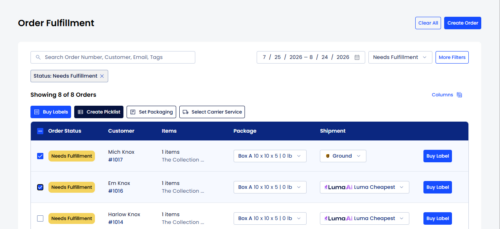
Review the list, adjust anything that looks wrong, and confirm. Every label buys at once.
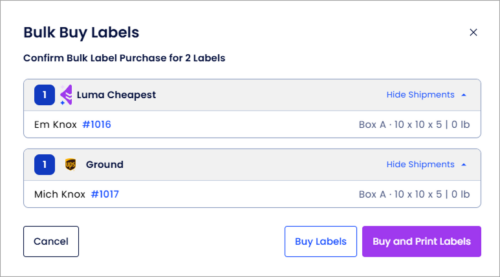
You can select every order on the page and then deselect the ones that aren’t ready. Nothing forces you into an all-or-nothing purchase.
Need just one label? Quick Buy has you covered
Quick Buy does the same thing for a single order without making you open it. Find the order, adjust packaging or carrier inline, click “Buy Label”.
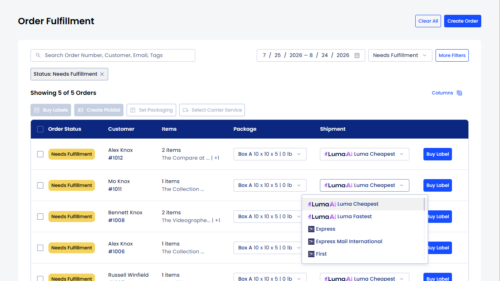
It sounds like a small thing. It isn’t. Most sellers’ days are a mix of both — a batch in the morning and a trickle of one-offs after that. Handling the trickle used to mean opening the order drawer every time.
For a side-by-side on the different ways to buy a label in Nexus, see the full Bulk Buy walkthrough in the Help Center.
Create your own shipping rules
By default, labels purchased with Bulk Buy and Quick Buy will be automatically selected by Luma AI with a balance of delivery speed and cost in mind. You can change this setting at any time by clicking “Select Carrier Service”. From there you can choose between presets for the cheapest or fastest label, or make a custom shipping rule.
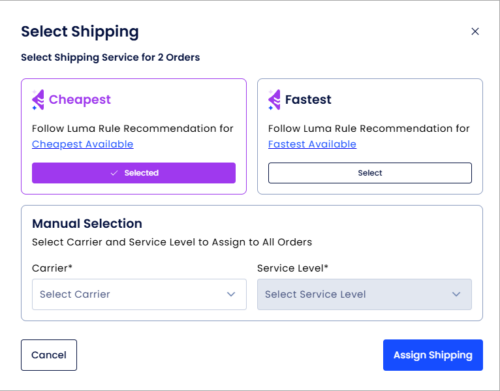
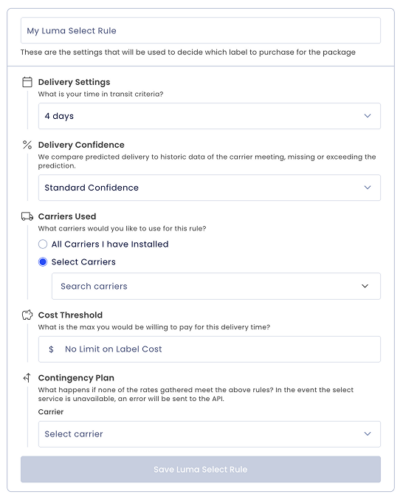
By default, the labels will be auto-selected by Luma AI with a balance between speed and cost. You can click “Select Carrier Service” to change the selection to the cheapest label, the fastest, or a custom rule you create yourself. You can set the following parameters to fine-tune the rate selection process:
- Number estimated delivery days
- Delivery estimate confidence
- Allowed carriers
- Maximum label cost
Manage all your orders with a snap of the finger
In addition to Bulk Buy and Quick Buy, Nexus users can now easily do the following from the Orders dashboard:
- Create Picklists
- Set Packaging for multiple orders at the same time
These features will keep orders tidy and make managing your business a whole lot simpler. We hope you enjoy this update and thank you for choosing Nexus.
The decision worth revisiting
The workflow you use to buy labels is a decision, even if you never made it deliberately. Most sellers are still running the one that made sense at a tenth of their current volume.
Nexus is free on Wallet carriers up to 3,000 labels a month, so the only thing between you and a shorter fulfillment cycle is changing how you buy.
Get Started Free — or see how shipping software for small business fits the rest of your stack.